
“The ad copy tool didn’t just outperform off-the-shelf solutions from industry giants like Google and Adobe, it actively drove revenue while drastically cutting down the time our team spent on copy changes.”

Overview
The Client
Farfetch is a leading online luxury fashion retailer.
My Role
Product Design, Product lead, UX, UI
The Challenge
Create a tool that would create and manage 5 million highly tailored ads in 12 languages across multiple platforms.
The Outcome
By automating manual processes, I saved each team member 80% of their operational time and shifted our entire focus toward high-level strategy and innovation. The resulting tool drove a 20% bump in incremental revenue and a 30% Quality Score boost, eventually becoming the blueprint for all cross-channel ad copy.
Context & Research
When trying to manage ads for 2000 designers in 12 languages across multiple global search engines within a small team during flash promotions , human errors are not welcome but expected. Simplifying a complex ad account structure, to tailor every ad to the designer and category, when Farfetch sells every fashion category is impossible. On top of it the ads need to be optimised for different Global Search Engines (Naver, Yahoo JP, Bing etc).
Requirements:
Commercial relevance - the tool needs to generate ads that are brand specific, keyword rich and leading traffic to correct landing pages
Operational efficiency- replace off-the-shelf software with a custom tool that would work across different search engines, languages, and overcome trademark issues
Ease of use and familiar to the revolving team for a steep learning curve
Problem Statement
Ad management was a manual, fragmented process with no oversight of landing page accuracy or brand coverage. Without a customisable solution, reacting to short-term promotions was slow and error-prone. I recognised that we needed an automated tool to streamline ad creation and ensure strict adherence to brand guidelines and media requirements.
The Design
Discovery & Alignment My initial research revealed severe vulnerabilities: frequent system crashes, zero visibility into active ads, and fractured messaging alignment with the website. To bridge these gaps, I led team shadowing and deep-dive Q&A sessions with the wider department to map out core workflows. Global localisation added immense complexity, requiring me to design for intricate linguistic rules like German noun variations. While the full ecosystem took years to mature, I strictly prioritised the MVP, deferring multi-language and cross-engine features to focus entirely on ensuring the tool flawlessly generated ads for every designer and category instance.
Testing & Iteration When I tested my initial prototype, it quickly exposed critical usability and performance bottlenecks. Cell-by-cell entry and Excel uploads proved highly inefficient, so I pivoted my design to a frictionless bulk copy-paste solution. Furthermore, large evergreen campaigns triggered severe processing delays, taking 6 to 12 hours for errors to surface in the Search Engine UI. To eliminate this risk, I designed a small-batch workflow paired with an API-powered preview tool, allowing users to instantly validate data and catch errors before final deployment.
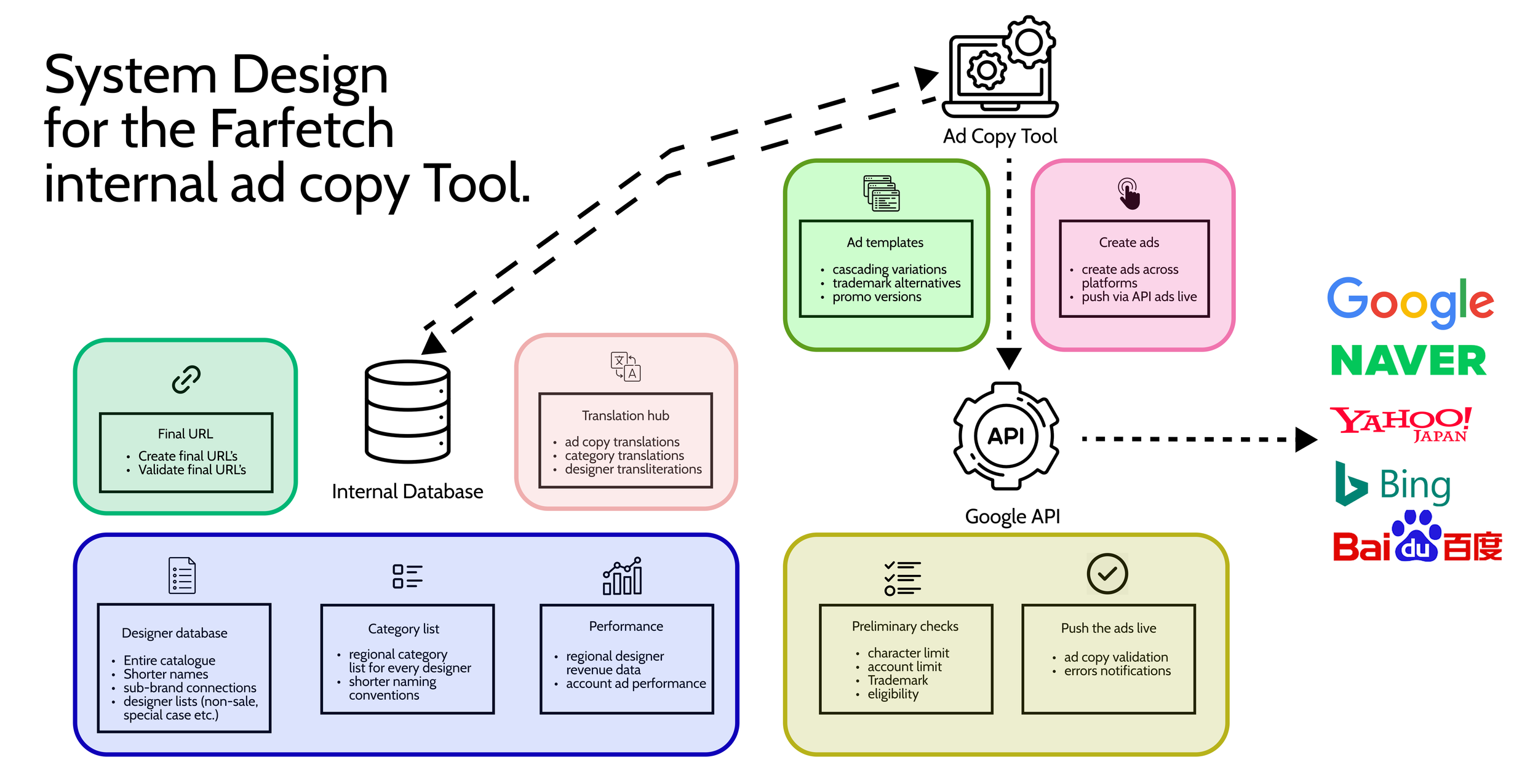
System design - this graph illustrates the backend complexity required to generate and maintain 5 million global ads across 12 languages. To deliver a seamless user journey, the tool connects our internal database with strict search engine API constraints (character lengths and content rules) while navigating a highly fragmented promo landscape—ensuring every designer and category receives dynamically tailored messaging.
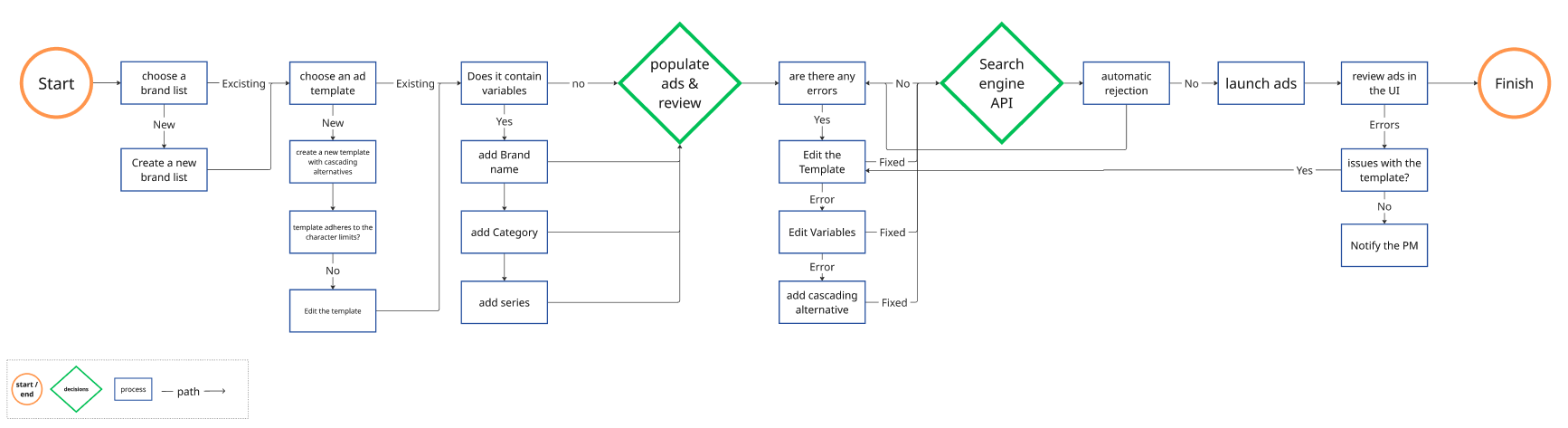
The User Flow maps the tool’s logic, starting with complex brand segmentation across 3,000 designers—categorised by sale, flash promo, or full-price status. From there, users select templates featuring cascading variations to ensure the final ad copy fits specific brand or category variables.
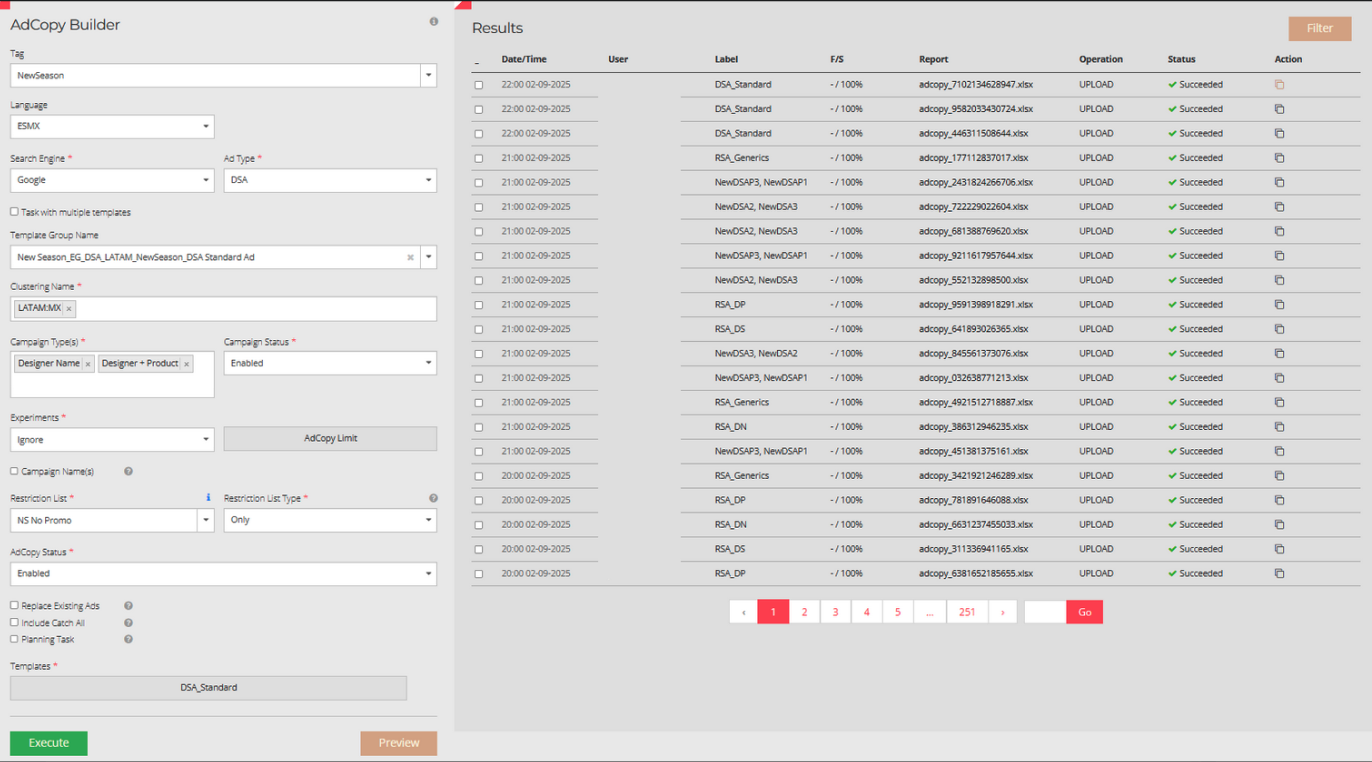

The final interface design. Built for familiarity, the interface mirrors the logic of established search tools to ensure a flat learning curve while maintaining strict WCAG accessibility standards. Placing the settings panel on the left intentionally aligns with standard search engine layouts to minimise cognitive load. For ad copy uploads, a dedicated modal window provides a seamless copy-paste workflow that automatically closes upon saving. Driven by tight project timelines, the design prioritises core functionality over complex visuals, utilising a clean, minimalist colour scheme to maximise operational clarity.
Iterations & Learnings
Bulk Actions Over Manual Input: Replaced tedious cell-by-cell data entry with a "bulk-paste" feature for headlines and descriptions, drastically reducing user effort and interaction time.
Scale Optimisation & Error Prevention: With some accounts generating up to 250k ads, waiting hours for job completion posed a high risk of error fatigue. I introduced a small-scale preview step, allowing users to catch and fix mistakes instantly before processing the full batch.
Automated Trademark Safeguards: To tackle persistent trademark disapprovals, I designed a cascading alternative system. If a brand-specific variable is flagged, the system automatically swaps it for generic, compliant copy—keeping ads live while strictly adhering to search engine rules.
Global Efficiency: Enabled single-language updates to sync across multiple accounts simultaneously, eliminating redundant workflows.
Operational Consistency: Implemented a "weekly re-run" feature to guarantee 100% brand coverage and prevent ad fatigue.
Advanced Testing Capability: Automated the deployment of variations for A/B testing, transforming the tool from a basic utility into a robust control center for global ad management.
Conclusion & Reflection
The Impact: By automating these processes, I saved each team member 80% of their operational time, allowing the department to pivot from manual execution to high-level strategy. Instead of spending endless hours on Excel the team was now optimising and innovating the activity instead.
Results by the Numbers:
Performance: Tailored ad copy drove a 30% improvement in Quality Score and a significant boost in CTR.
Revenue: Delivering scalable, approved ads for every designer resulted in a 20% increase in incremental revenue.
Scalability: The tool’s success led to its adoption by SEO and Paid Social teams, becoming the blueprint for cross-channel ad copy and translations.
Bridging the Gap This was my first experience balancing product management with UX and marketing. I learned that cross-functional collaboration with remote engineers requires a shared language. This taught me that clarity isn't about "common sense", it’s about proactive alignment and building a bridge between different areas of expertise.
What I Would Do Differently The biggest lesson was the value of earlier user testing. I learned that what feels intuitive when you're "in the weeds" of design isn't always clear to a fresh pair of eyes. I also discovered that even the most detailed documentation cannot replace direct conversation; I now prioritise regular check-ins to ensure alignment as requirements evolve, rather than relying solely on a handover file.
Check out my other projects below.
Have questions about my process or just want to chat about the design?
I’d love to hear your thoughts. Get in touch.